Hey there, if you’re here reading this, chances are you’re either gearing up for a small electrical project, dealing with a cable mess that’s way past time to fix, or maybe you just picked up some light duty cable tray from someone like me and are now staring at it wondering, “Wait, how do I actually mount this vertically without messing it up?” Let’s cut to the chase—vertical light duty cable tray installation isn’t just grabbing your drill and slapping it to a wall. I’ve seen too many folks (even some seasoned electricians who usually work with bigger setups) skip a step or two here, and end up with saggy cables, weird clearance issues, or even something that’s just not code-compliant. As someone who’s been in the light duty cable tray game for over 8 years, helping people like you sort through the small stuff that makes all the difference, I’ve got a solid list of considerations to run through before you swing that drill. Light Duty Cable Tray
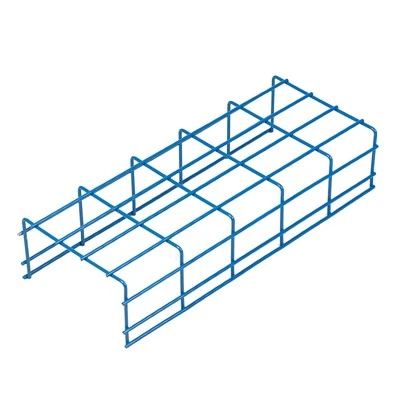
First off, let’s get one thing straight: light duty cable tray isn’t the heavy industrial stuff you see supporting power lines in a warehouse. This is the stuff for low-voltage cables—think data lines, Ethernet, security camera wires, thermostat cables, maybe some small control lines for a home office or a small retail space. It’s lightweight, easy to cut, and way cheaper than the big boys, which is why it’s so popular for small to mid-sized projects. But that also means its load limits are way lower, so if you try to cram too much into it or mount it wrong, it can’t handle the weight, no matter how good the brand is. That’s the number one consideration, right off the bat: load capacity, specifically tailored for vertical installs. Wait, why is vertical different from horizontal? Because in a horizontal tray, cables sit on the bottom, spread out a bit, and gravity pulls them down evenly. In a vertical tray? Cables are running up or down along the side, so every single cable’s weight is pulling along the length of the tray, not just resting. So if you’ve got a vertical run that’s 10 feet high, and you’ve got 20 Ethernet cables in there, that’s more tension on the tray’s supports than you’d get if those same cables were in a horizontal run of the same length. I always tell my customers: check the specs on the tray box—most light duty models have a load rating for horizontal and vertical, and they’re rarely the same. Don’t just go by the horizontal number. For example, our standard 4-inch light duty tray has a horizontal load limit of 15 lbs per foot, but vertical is only 8 lbs per foot. That’s a huge gap, and skipping that means by the time you get halfway up the wall, the tray might start bowing outward or pulling away from the mounting brackets. So first step: do the math. Count every cable you’re putting in, add up their weights (most cable manufacturers list that on their data sheets—Ethernet is like 0.01 lbs per foot, so 20 of those is 0.2 lbs per foot, but if you’ve got bigger stuff like low-voltage control cable, that’s 0.05 lbs per foot, so 50 of those is 2.5 lbs, which is fine, but if you mix in a few thicker telephone lines or speaker wires, that adds up quick). If your total weight per foot is over the vertical limit, go a size up. Trust me, I’ve had a customer call me panicking because their 3-inch tray was sagging after they ran 100 Ethernet cables up a wall, and switching to a 4-inch (which has a higher vertical load) fixed it in 10 minutes.
Next up: mounting bracket spacing. Horizontal tray installers usually do about 4 feet between brackets, right? For vertical? That’s way too much. Because vertical runs have to hold not just the weight of the cables, but also the entire length of the tray itself. Light duty tray is made of thin steel or aluminum, so it’s not rigid like a pipe. If you space brackets too far apart, the middle of the run will flex, and cables will pull away from the tray, or even the tray will bend enough to crack at the joints. I recommend 2 feet maximum between brackets for vertical runs. Wait, but what if you have a longer run—like 15 feet from a basement floor up to an attic? Then you can’t just have brackets every 2 feet, right? Also, you need end brackets—one at the bottom of the run, one at the top, and a midpoint bracket if the run is over 10 feet. Oh, and another thing: bracket placement near joints. Light duty tray sections connect with clips or screws, right? You always want a bracket within 6 inches of a joint, not just halfway along a section. If you leave a joint hanging out with no support, that’s where the tray will twist or come apart, especially when you’re pulling cables through it. I’ve seen that mistake so many times—someone installs a 5-foot tray section, puts a bracket at each end (which is fine for horizontal), but when they run it vertically, the joint in the middle pulls because there’s no bracket there. So rule of thumb for brackets: every 2 feet, plus within 6 inches of every joint, plus at every change of direction (even a tiny 90-degree turn for a corner). That goes for corners, too—wait, speaking of changes of direction, that’s another big one for vertical installs. If you have to turn the tray 90 degrees around a wall or a doorway, you can’t just bend the light duty tray to fit. Those tray sections are pre-cut, and light duty is not meant to be field-bent (unless it’s flexible light duty, but even then, not for sharp turns). You need a pre-fabricated elbow, either 90-degree or 45-degree, made for light duty tray. Why? Because if you bend it yourself, you’ll crease the metal (or aluminum), which weakens the tray, and the sharp bend can cut the outer sheath on the cables as you pull them through. I had a customer once try to bend a 3-inch aluminum light duty tray around a kitchen corner, and within a month, three of his security camera cables had frayed from the sharp metal edge, leading to camera dropout. That’s a avoidable headache, and a $5 elbow would’ve fixed it. Also, when you install an elbow, make sure it’s supported with a bracket too, just like a straight section. That turn is a stress point, so it needs extra support, not less.
Now, clearance—both for the cables and for code. A lot of first-timers don’t think about this, because horizontal tray is usually out of the way, but vertical is right where you’re walking, or near doors, or near other electrical stuff. First, working clearance: if someone has to access that area later for maintenance, you can’t have the tray sticking out 2 inches from a wall where a wheelchair might pass, or right next to a door that swings open (it’ll get hit and pull away). For light duty tray, I recommend at least 18 inches of working clearance on all sides for areas that need regular access, and at least 6 inches for areas that are only accessed occasionally, like a basement utility closet. Then there’s electrical clearance, specifically for NEC (National Electrical Code, if you’re in the US—most other countries have similar codes). NEC says that low-voltage cables (which is what light duty tray is mostly used for) have to be separated from power cables (120V and up) by at least 2 inches, or in a grounded metal tray. Wait, if your light duty tray is metal, that works as a grounded shield, right? But if it’s plastic light duty tray (which is super popular for small projects, since it’s cheap and no rust), then you have to keep those low-voltage cables at least 6 inches away from power cables. That’s a big one. I had a customer last month who installed plastic vertical tray next to some 120V lighting wires, and his Ethernet started having interference—he couldn’t stream Netflix in his home office at all. We moved the tray 8 inches away, and it was fixed. That’s not just a comfort thing—interference can mess with security camera feeds, control signals, even internet that’s critical for a small business. Also, don’t run vertical tray over any heat sources—like furnaces, water heaters, or ceiling light fixtures that get hot. Light duty tray is not rated for high temperatures, so if you run it over a furnace, the plastic will warp, or the metal will get hot enough to melt cable sheaths. Keep it at least 3 feet away from any heat-producing equipment, per code.
Cable management inside the tray, especially vertical. I know it’s tempting to cram every cable you have into one tray to save space, but that’s a bad call for vertical. In horizontal, you can spread them out, but in vertical, all those cables are pulling down, so if they’re too tight, they’ll fight each other, and some might pop out of the tray’s edge or get stuck. How much is too much? Most light duty tray specs say that you should fill it no more than 40% of its internal height for vertical runs. Wait, why 40%? Because horizontal is usually 60% max, but vertical needs room for the cables to hang without bunching up. If you fill it more than that, you’ll have to apply way too much tension when you pull cables through, which can damage the cable conductors, leading to poor connections or short circuits later. Also, when pulling cables vertically, you want to use cable ties or support clips every 3 feet, not just at the top. I use 6-inch cable ties spaced every 3 feet along the run, because that takes some of the weight off the tray’s joints and brackets. If you just pull all the cables up and tie them at the top, the weight of all those cables hanging down will strain the top bracket, and the tray might pull free from the wall. Another tip: label the cables as you go. If you have a bunch of Ethernet, security, and thermostat lines, mark them with little tags so when you need to replace or add one later, you don’t have to pull them all out to find the right one. Saves you so much time down the line.
Wait, what about mounting surface? That’s a huge one that people overlook too. You can’t just mount light duty tray to drywall, right? Drywall is too flimsy, it won’t hold the weight of the tray and cables, especially vertical. You have to mount it to a solid surface: wooden studs, concrete, or metal studs. If it’s drywall only, you’ll need to use heavy-duty drywall anchors, but even then, I don’t recommend it for vertical runs over 5 feet. For concrete walls, use concrete screws or wedge anchors, not regular wood screws—they won’t grip. For metal studs, use self-drilling screws that are rated for metal, not wood screws. I’ve seen someone mount a vertical tray to drywall in a home office, and after a few months, the whole tray came crashing down while they were pulling a new cable, taking their security camera and Ethernet lines with them. That’s a nightmare, and all because they didn’t check the mounting surface. Also, if you’re mounting outdoors? Wait, some light duty tray is rated for outdoor use, but most is for indoor. If you’re doing a vertical run outside—like along the side of a shed or a patio—you need to get UV-resistant, corrosion-resistant light duty tray, either galvanized steel or UV-stabilized plastic. Regular indoor tray will get brittle in sunlight, or rust and fall apart in rain. I have a line of outdoor-rated light duty tray specifically for these jobs, and I always make sure my customers know the difference—don’t use indoor stuff outside, no matter how cheap it is.
Oh, and don’t forget about expansion and contraction! Wait, light duty tray is made of metal or plastic, both of which expand when it’s hot and contract when it’s cold. That’s not a big deal for horizontal runs that sit flat, but vertical runs can get long enough that the change in temperature makes the tray grow or shrink a lot. For example, a 20-foot metal tray can expand up to 0.2 inches in 100-degree heat, which might not sound like much, but if the tray is bolted tight at both ends, that can cause it to buckle or pull away from the wall. The fix? Leave a 1/8-inch gap between the end of the tray section and the end fitting, or use slip joints for long runs. Slip joints let the tray move slightly with temperature changes without putting stress on the brackets. I always include slip joints with any light duty tray order over 10 feet, because it’s such a simple fix for a problem that most people don’t even think about until it’s too late.
Wait, let’s recap all this so it’s not just a jumble of thoughts: load capacity (don’t use horizontal ratings for vertical), bracket spacing (max 2 feet, plus near joints and corners), proper elbows for turns, clearance (code and working), cable fill limit (40% max), mounting surface (solid, not drywall unless anchored), expansion joints for long runs, and surface rating (indoor vs outdoor). Is there anything I missed? Oh, ground! If you’re using metal light duty tray, you need to ground it, right? Per code, all metal cable trays have to be grounded to prevent shock hazards. For vertical runs, you can run a separate ground wire along the tray, or use the tray itself as a ground path, but you have to make sure all the joints are connected tightly so there’s good conductivity. I always tell customers to test the ground with a multimeter after installing, just to be safe—better safe than sorry, especially if the tray is near people or power lines.

At the end of the day, vertical light duty cable tray install isn’t rocket science, but it’s the small details that make it work. I’ve seen projects go right because someone took 10 minutes to check the load rating, and I’ve seen projects go wrong because they skipped that step. If you’re ever in doubt about anything—whether it’s sizing the tray, picking the right brackets, or figuring out clearance—hit me up. I’ve been in this game long enough to help you navigate it, no pressure, just good advice. Don’t risk your cables or your project by cutting corners—take the time to plan it right, and your vertical tray will last for years, no sagging, no interference, no headaches. If you’re ready to get the right light duty cable tray for your vertical install, or just have a question about anything we talked about, reach out to us and we can chat through all the details to make sure your project goes smooth.
Light Duty Cable Tray REFERENCES
- National Electrical Code (NEC) Article 392, Cable Tray Systems
- Underwriters Laboratories (UL) Standard 2024, Cable Tray Systems
- Light Duty Cable Tray Manufacturer Technical Specifications, General Catagory
Hebei Jinglang Industrial Co., Ltd.
As one of the most professional light duty cable tray manufacturers and suppliers in China, we also support customized service. We warmly welcome you to wholesale high quality light duty cable tray in stock here from our factory. If you have any enquiry about quotation, please feel free to email us.
Address: Nanxinzhuang Village, Daweihe Hui and Manchu Township, Wen’an County, Langfang City, Hebei Province
E-mail: 18231629992@163.com
WebSite: https://www.jinglangcabletray.com/
