If you’ve ever relied on smart home tools or city utility systems, you know how frustrating it is when a critical piece of tech suddenly goes offline. As an IoT remote water meter supplier, I’ve heard this complaint hundreds of times: my meter was working perfectly last week, and now it’s not sending data. The good news is that most issues aren’t major—they’re solvable with step-by-step troubleshooting, and you don’t need a degree in engineering to figure them out. Over the years, I’ve helped residential property managers, small business owners, and even municipal maintenance teams walk through these fixes, so I’ve put together a practical guide that works for almost every IoT remote water meter model we supply. Let’s dive in. IoT Remote Water Meter
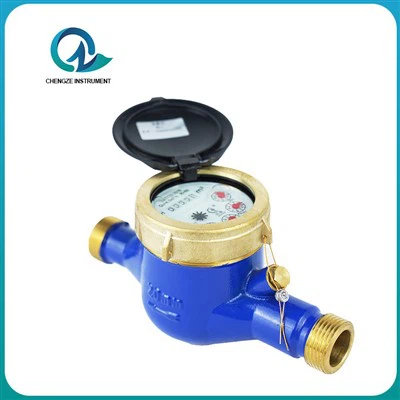
First, before you grab a wrench or call for a service tech, start with the basics that people often skip—and these account for about 40% of the “broken” meters we see, from our internal customer data. Think of this as the pre-check phase, because it’s fast, free, and saves everyone time. The first thing to confirm is power. Most IoT remote water meters run on long-lasting lithium-ion batteries, designed to last 5-10 years depending on use, but that doesn’t mean they never drain early. If your meter uses a replaceable battery pack, you can usually access it through a small panel on the side of the unit (pro tip: keep the replacement size written on the inside of the meter’s cover so you don’t have to guess). If it’s a hardwired model (though less common for remote deployment), check the circuit breaker or connection point near the meter—sometimes a building’s electrical work can trip a breaker without anyone noticing.
Next, check the network connection. IoT meters rely on cellular, LoRaWAN, or NB-IoT to send data, and weak or blocked signals are the second most common issue. Here’s how to test this: pull up the app or web portal that came with your meter (we build custom dashboards for all our clients, so yours will have a “signal strength” indicator). A reading below 2 out of 5 means a problem. If you’re in a rural area, cellular signal might be weak, or if the meter is installed in a basement, metal utility closet, or behind thick concrete walls, it can block radio waves. One quick fix we recommend for our clients is placing a small, magnetic signal repeater near the meter (we sell these as add-ons, but you can find compatible third-party ones too) that amplifies the cellular or LoRa signal without needing to run new wires. Another network check: make sure the meter hasn’t been deactivated in your account. It’s easy to accidentally unlink a device when updating your dashboard, so just log in and confirm the meter’s status is marked “active.”
Once you’ve ruled out power and network, it’s time to look at the physical meter and water flow itself. Wait a second—if there’s no water flowing through the meter, it’s going to stop sending data, right? That sounds obvious, but it’s a common oversight. For example, if you shut off a building’s main water supply for repairs and forget to turn it back on, or if a pipe downstream has a leak that caused a pressure drop so low the meter’s flow sensor can’t detect movement, the meter will go into a low-power sleep mode to preserve battery, and appear “dead.” To test this, open a cold faucet in the area connected to the meter. If the water comes out weakly or not at all, that’s a plumbing issue, not a meter problem. If the water pressure is good, then look for physical obstructions around the meter. Sometimes, during construction or landscaping work near a property, debris like dirt, small rocks, or even construction plastic can get packed around the meter’s sensor housing, blocking the flow. If the meter is installed outside, check for snow or ice buildup around the unit—we’ve had customers report meters freezing in winter, which damages the flow sensor until it thaws.
If power, network, flow, and physical obstructions all check out, the next step is to do a software reset. This is like restarting your laptop when it freezes, and it fixes a huge range of glitches where the meter’s onboard firmware crashes or hangs. The process is designed to be simple for non-technical users: almost all our meters have a small reset button, usually recessed under a rubber cover to keep water out. You just press and hold it with a paperclip or small screwdriver for 10-15 seconds, until the small LED light on the meter blinks twice (that’s the confirmation it’s resetting). Once it restarts, which takes about 2 minutes, it will reconnect to the network and start sending data again. A quick note: don’t hold the button too long—20 seconds or more can reset the entire device to factory settings, which will erase any custom configuration (like the property address or account linked) and you’ll have to set it up again, which is an extra step no one wants.
If none of those steps work, it’s time to dig a little deeper into sensor calibration and software updates. Flow sensors in IoT meters are precision parts, designed to measure water volume with 99% accuracy, but they can drift slightly over time, especially if they’re exposed to hard water with mineral buildup, or sediment from old pipes. To check calibration, most of our dashboards have a “test mode” feature that lets you run a manual flow test. Just open a faucet for a set amount of time (say, 10 seconds) and compare the volume the meter records to the actual volume you collected in a bucket. If there’s a difference of more than 5%, the sensor needs a light cleaning or recalibration. For mineral buildup, we recommend turning off the water, removing the sensor housing, and gently scrubbing it with a soft brush and white vinegar (avoid harsh chemicals that can damage the sensor’s coating). If recalibration is needed, our support team can walk you through the steps via a quick call, or send a firmware update remotely—we can push updates to all our meters in the field without requiring a technician to visit, which saves clients hundreds of dollars on service calls.
Wait, there’s a common mistake we see that’s worth mentioning: some customers mix up “offline” with “not working.” IoT remote water meters don’t send data every single second—they’re designed to send batches of data, usually every hour or every day, to save battery. If you check the portal and the last update was marked 2 hours ago, that’s not a problem; it’s just the meter following its power-saving schedule. Our dashboards use color-coded statuses: green means active and sending data, yellow means low signal or waiting to transmit, red means offline for more than 72 hours. If it’s yellow, that’s usually a temporary issue that will fix itself once the network signal comes back or the meter finishes its transmission window.
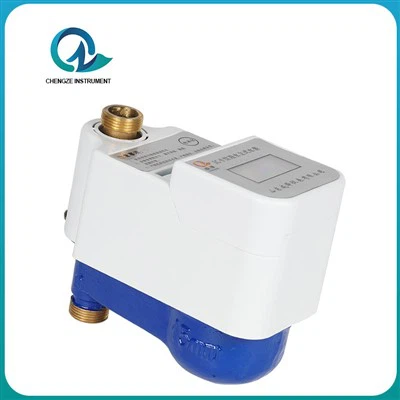
Now, when should you consider that the meter actually needs replacement? After troubleshooting, if the LED light never blinks when you try to reset it, or the flow sensor doesn’t react even after cleaning and recalibration, that’s a sign of internal damage—usually from extreme temperature, water infiltration, or power surges. For these cases, we offer a straightforward replacement program, and we’ll even take back the old unit for responsible recycling, since lithium batteries and circuit boards shouldn’t end up in landfills.
Ultrasonic Water Meter Over the years, I’ve learned that the key to troubleshooting IoT water meters is patience and systematic checking—don’t skip the basic steps, because 9 out of 10 issues are resolved with power, network, or flow fixes. If you’ve gone through all these steps and the meter is still not working, our team is here to help. We work with property managers, municipalities, and residential customers, and we can provide remote support, replacement parts, or new meter installations tailored to your needs. If you’re looking to upgrade from traditional mechanical water meters to an IoT system, or need reliable support for your existing setup, don’t hesitate to reach out to our sales team to discuss your requirements.
References
- International Association of Plumbing and Mechanical Officials (IAPMO). "Smart Water Meter Best Practices for Residential and Commercial Deployment." 2023.
- GSM Association. "IoT Network Reliability for Utility Meters: Signal Strength and Deployment Guidelines." 2022.
- Water Research Foundation. "Sensor Calibration and Maintenance for IoT-Based Water Flow Meters." 2021.
- National Institute of Standards and Technology (NIST). "Lithium-Ion Battery Lifespan and Performance for Remote Utility Devices." 2023.
Shandong Chengze Instrument Co., Ltd.
We’re well-known as one of the leading iot remote water meter manufacturers in China, featured by quality products and good service. Please rest assured to buy high-grade iot remote water meter for sale here from our factory. Also, customized service is available.
Address: No.7, Wensi Road North Industrial Park, Liguan Town, Lanshan District, Linyi City, Shandong Province, China
E-mail: czwatermeter@163.com
WebSite: https://www.cz-watermeter.com/
